
General Discussion
SITE HELP - Internal Image Linking
Submitted by Dreamweaver on Thu, 2008-09-04 08:56OTHER SITE HELP
For a list of other HELP topics, including an introduction to posting and computing terms, refer to this Index Thread
INTRODUCTION
Previously, I covered the most basic method of posting an image via this site's Create Content - Photo facility. The thread for these instructions can be found by clicking HERE.
I also covered the first of three alternatives for posting multiple images or embedding one or more images into a new post in an existing thread HERE. This first option deployed the use of a REMOTE HOST to store your image/s and then linking to them within your post on this site.
Now I'll move onto the second option for situations where you wish to:
This second option is called INTERNAL IMAGE LINKING.
The advantages of this method are:
With this method, you:
Here is an example of where this has been used to upload an image to this site and then display (imbed) it in an existing THREAD new post .
PROCEDURE
NOTE - If you are going to post an image or images, and follow these instructions as you do it, then it suggested you open two sessions of Fishwrecked and display this post in one, whilst you perform the posting in the other. I find it easier to open two separate browser sessions rather than two tabs within one session. Then you can use ALT/TAB to toggle (swap) between them.
Upload Your Image/s To This Site
This is essentially the same procedure as documented in the thread SITE HELP - Posting Images Via New Thread, with one difference - you don't add text because you'll be doing that in the new THREAD or existing THREAD new post that you'll be adding your image/s to.
STEP 1 - On the LHS of the site is a Create Content item, if this doesn't show two items (Photo and Forum Topic), click on this to display these:

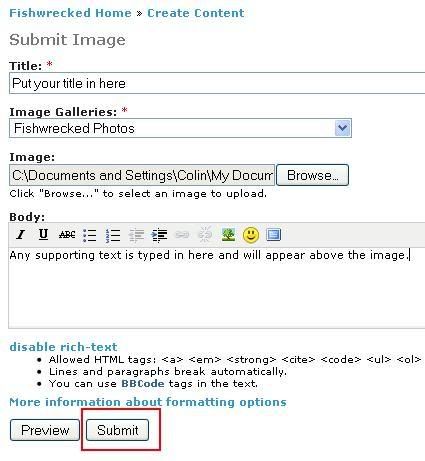
STEP 2 - Click on the Photo item - the following screen is displayed:
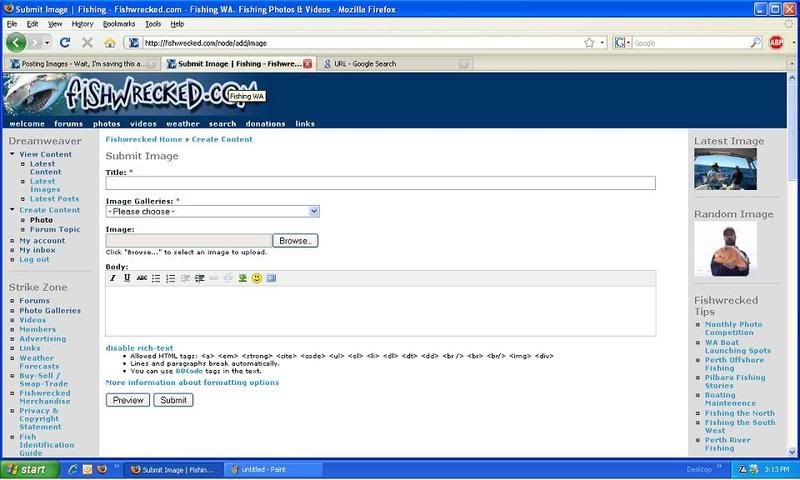
Complete the Submit Image screen:
STEP 3 - TITLE - Type your desired title in the box below where it says Title
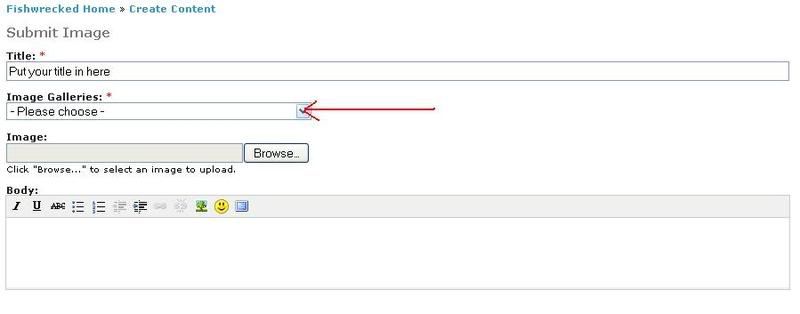
STEP 4 - GALLERY
- Select an image gallery - this tell the site software where to store your image on this site. Click where indicated on the following diagram:
- A drop down list will appear:
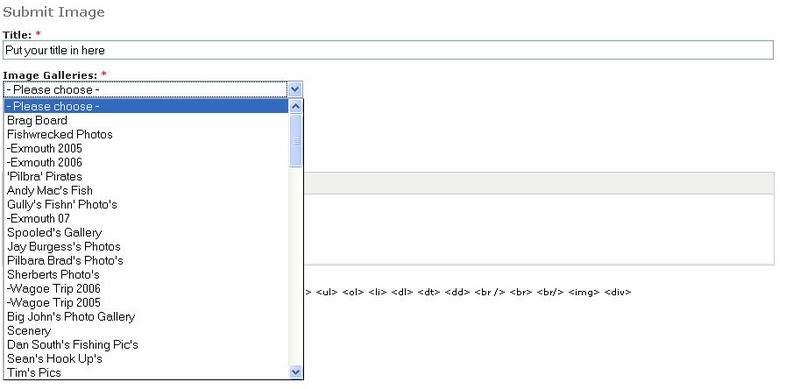
Unless you have had Adam set you up with your own photo gallery (you'll need to send him a PM request), you'll need to select one of the general galleries - for example fishwrecked photos:

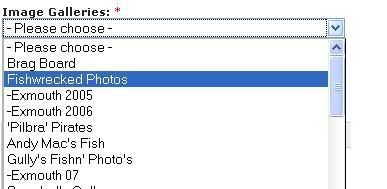
Simply place your cursor over the desired gallery and click on it. The Images Gallery field will now be populated (fill in) with desired glallery:
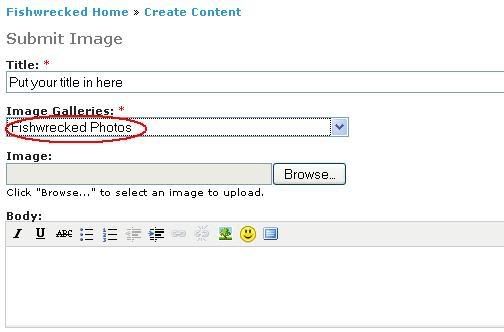
STEP 5 - SELECT IMAGE TO UPLOAD
- Click on the Browse button to the right hand side of the Image field:
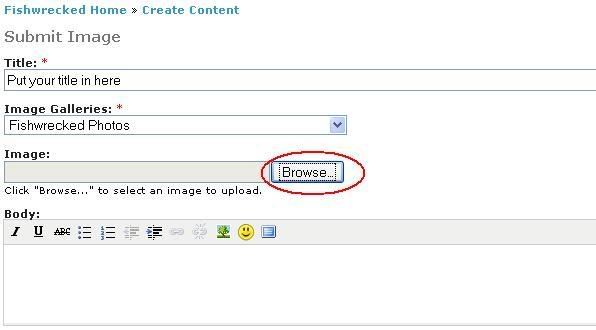
- Assuming you are using a Microsoft Operating System you will see the following dialogue (screen):
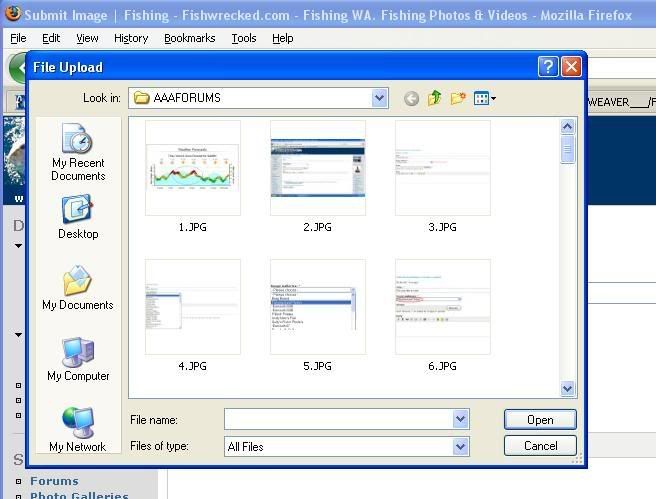
- Simply browse to your desired picture, click on the desired item (see note below) to populate the dialogue file name field with the desired image, then click on the Open button within the dialogue - the dialogue will dissapear and the Image field in this site's Submit Image screen will be populated with the location of the image on your PC:
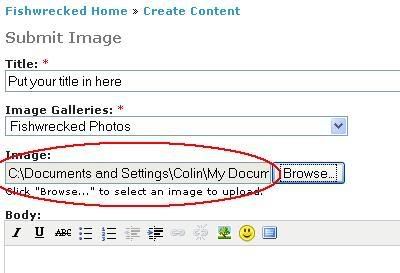
NOTE - What will be displayed in your File Upload dialogue, will depend on how you have the directory of the folder that contains your image set up. Whether you display details, thumbnails (small images) etc.
STEP 6 - POST YOUR IMAGE - Click on Submit button :
STEP 7 - START YOUR TEXT POST :
Either by using this site's Create Content - Forum Topic if intend to start a new THREAD, or click on the existing Forum Topic or Image THREAD if you intend to add a post.
NOTE - For demonstration purposes, this procedure adds one image to a post.
STEP 8 - COMPLETE THE APPROPRIATE POST FIELDS:
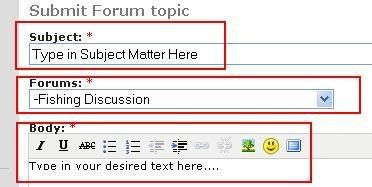
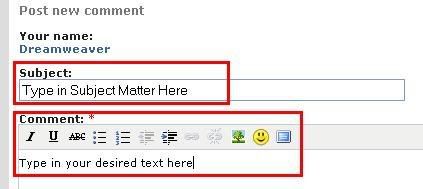
Now we start the process of linking to your previously posted image/s.
STEP 9 - OPEN ANOTHER BROWSER SESSION - Again, I prefer to open a completely separate session, rather than a tab within the same session as you can use the ALT/TAB keys to toggle between the two.
STEP 10 - DISPLAY THE IMAGE YOU WISH TO LINK TO - From this site select your desired image post.
STEP 11 - OBTAIN THE IMAGE PATH.
This is the address of the image on this site, that is, where it is stored when you previously posted it :
FIREFOX: (scroll down slightly for Internet Explorer procedures)
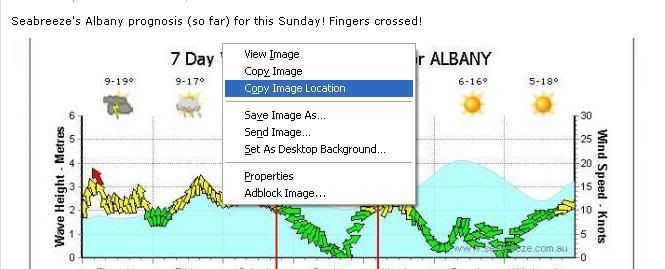
INTERNET EXPLORER:
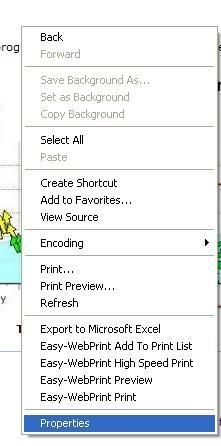
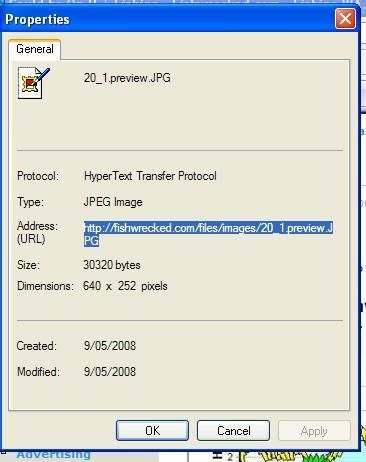
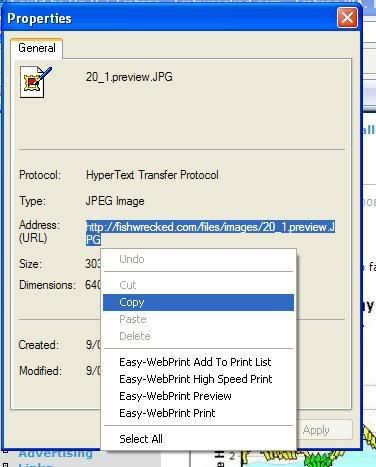
Now you know why I use Firefox!
In both cases we have now copied the address of the image. We will now paste that copied image address into the Body (new THREAD) or Content (existing post) field, just below our text in the other browser session.
STEP 12 - PASTE THE IMAGE ADDRESS.
Paste the the address in either the Body or Content fields below your text (right mouse click and paste or simultaneous use of the CNTL and V keys) - it will look like this:

STEP 13 - FORMAT THE IMAGE ADDRESS.
We need to add some code either side of the address - this basically tells the sight to display the content at the copied address as an image (IMG).
Add [IMG]at the beginning of the copied image address and [/IMG] at the end of the address. NOTE that these are different!
Now your code that will display the image should look like this:

IMPORTANT - Make sure there are no spaces between the IMG tags and the code, otherwise your image/s will not display!
There are parameters and sub parameters you can add into this code, but that I'll leave for another topic.
To add multiple pictures, simply repeat from Step 10 onwards.
STEP 14 - PREVIEW AND OR SUBMIT.
When you have finished with your text, pasting the address of the image/s and adding the IMG tags at either end of the image address, all that remains to be done is preview and/or submit your post! .
JOB DONE!!
- 3 comments
- 21750 reads
SITE HELP - Image Posting Assistance
Submitted by Dreamweaver on Wed, 2008-09-03 17:37After assisting a number of people with image posting and seeing the number of enquiries, I've started putting together HELP threads. It's impractical to put all of this information in one thread. Inevitably, these threads will become 'spread out'.
So, until Adam gets a chance to install an alternative method, I've created this as something of an Index thread and will list the various HELP threads that I've created. Of course, nothing saying other HELP threads (created or yet to be) can't be added here.
Then all that is needed, is for this one thread to be bumped from time to time, to provide both visibility of, and navigation to, the various HELP threads.
Any worthwhile document including (hopefully) this one needs constant use assessment and may need alterations from time to time to make processes clearer and easier to understand. Similarly, dozens of brains are always better than one, so if you have a suggestion for documentation, sing out. This includes technical terms that you may not understand.
- 18 comments
- 87453 reads
SITE HELP - Posting Single Images - Via New Thread
Submitted by Dreamweaver on Tue, 2008-09-02 07:16OTHER SITE HELP
For a list of other HELP topics, including an introduction to posting and computing terms, refer to this Index Thread
INSTRUCTIONS
This is pretty straight forward. Typically, this method is used when you just have one image that you wish to post up and optionally (or not) add some text. You may (as has often been done)just want to post the image and let the title of the post say what you want to say. It's your choice.
With this method, the image is uploaded (copy transferred from your PC) to this site.
NOTE - If you are going to post an image or images, and follow these instructions as you do it, then it suggested you open two sessions of Fishwrecked and display this post in one, whilst you perform the posting in the other. I find it easier to open two separate browser sessions rather than two tabs within one session. Then you can use ALT/TAB to toggle (swap) between them.
STEP 1 - On the LHS of the site is a Create Content item, if this doesn't show two items (Photo and Forum Topic), click on this to display these:
STEP 2 - Click on the Photo item - the following screen is displayed:
Complete the Submit Image screen:
STEP 3 - TITLE - Type your desired title in the box below where it says Title
STEP 4 - GALLERY
- Select an image gallery - this tell the site software where to store your image on this site. Click where indicated on the following diagram:
- A drop down list will appear:
Unless you have had Adam set you up with your own photogallery (you'll need to send him a PM request), you'll need to select one of the general galleries - for example fishwrecked photos:
Simply place your cursor over the desired gallery and click on it. The Images Gallery field will now be populated (fill in) with desired glallery:
STEP 5 - SELECT IMAGE TO UPLOAD
- Click on the Browse button to the right hand side of the Image field:
- Assuming you are using a Microsoft Operating System you will see the following dialogue (screen):
- Simply browse to your desired picture, click on the desired item (see note below) to polulate the dialogue file name field with the desired image, then click on the Open button within the dialogue - the dialogue will dissapear and Image field in this site's Submit Image screen will be populated with the location of the image on your PC:
NOTE - What will be displayed in your File Upload dialogue, will depend on how you have the directory of the folder that contains your image set up. Whether you display details, thumbnails (small images) etc.
STEP 6 - SUPPORTING TEXT - Now, if you desire, type in any accompaying text in the Body field of this site's screen:
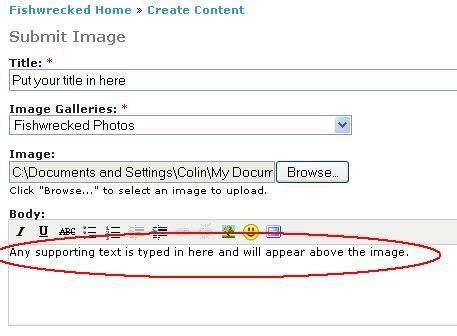
STEP 7 - POST YOUR IMAGE - Click on Submit button :
CONGRATULATIONS! You've just mastered how to post an image.
- 7 comments
- 133826 reads
Montebello Experience and Advice Sought
Submitted by clayd on Mon, 2026-06-15 15:48Planning a trip to the Montebello's in a few weeks. Keen to hear some thoughts on logistics.
Leaving from Perth. Not planning fill up extra fuel and water to keep weight down. Planning to get Minilya or Lyndon River first night, generally just pull over somewhere for the night. First set of questions:
1.Do I Fill up in Carnarvon with fuel and water so I can go straight to Fortescue River to launch, fill up at the nearest roadhouse to Fortescue River (Nanuturra), or go on to Karratha to fill up. If I go to Karratha, I'd probably stay the night there and stock up on food as well, then head to Fortescue the next morning.
2. Are there any concerns getting over De Boulay Creek on the way to Fortescue River for launching? I know we need to go low tide. Is it a solid bottom or can it be a bit dodgy?
3. Retrieving the boat from Fortescue. I hear reports of it being steep, plus it's unsealed. Should that be of any concern given I don't have a winch or tow points should I not be able to get up. In a Ranger 4wd with all terrains and boat will be approx 2.2T.
4. Is there any reliable mobile phone signal over at the Monties? Is it worthwhile throwing on a signal booster? I have got a SMS satellite communications, but no voice or data. Just worried about keeping up with weather forecasts. Planning on being there 3-4 nights.
5. Crossing conditions. I've not boated north of Exmouth, so don't know the relationship between sea state and wind speed and tide for that matter. Wondering what wind speed and directions I should be concerned about. 6.5m ally boat and I'm an experienced skipper (MC4).
Any experience, things that have and haven't worked, what you would do next time, appreciated.
Cheers,
Clay
- 5 comments
- 578 reads
Yet another shark victim
Submitted by Faulkner Family on Sun, 2026-06-07 20:12Just seen ghere was another shark victim. Down Albany way.
Was spear fishing close to shore
- 6 comments
- 968 reads
New regs for fishing
Submitted by Faulkner Family on Thu, 2026-05-28 06:38As expected. As of 1st June 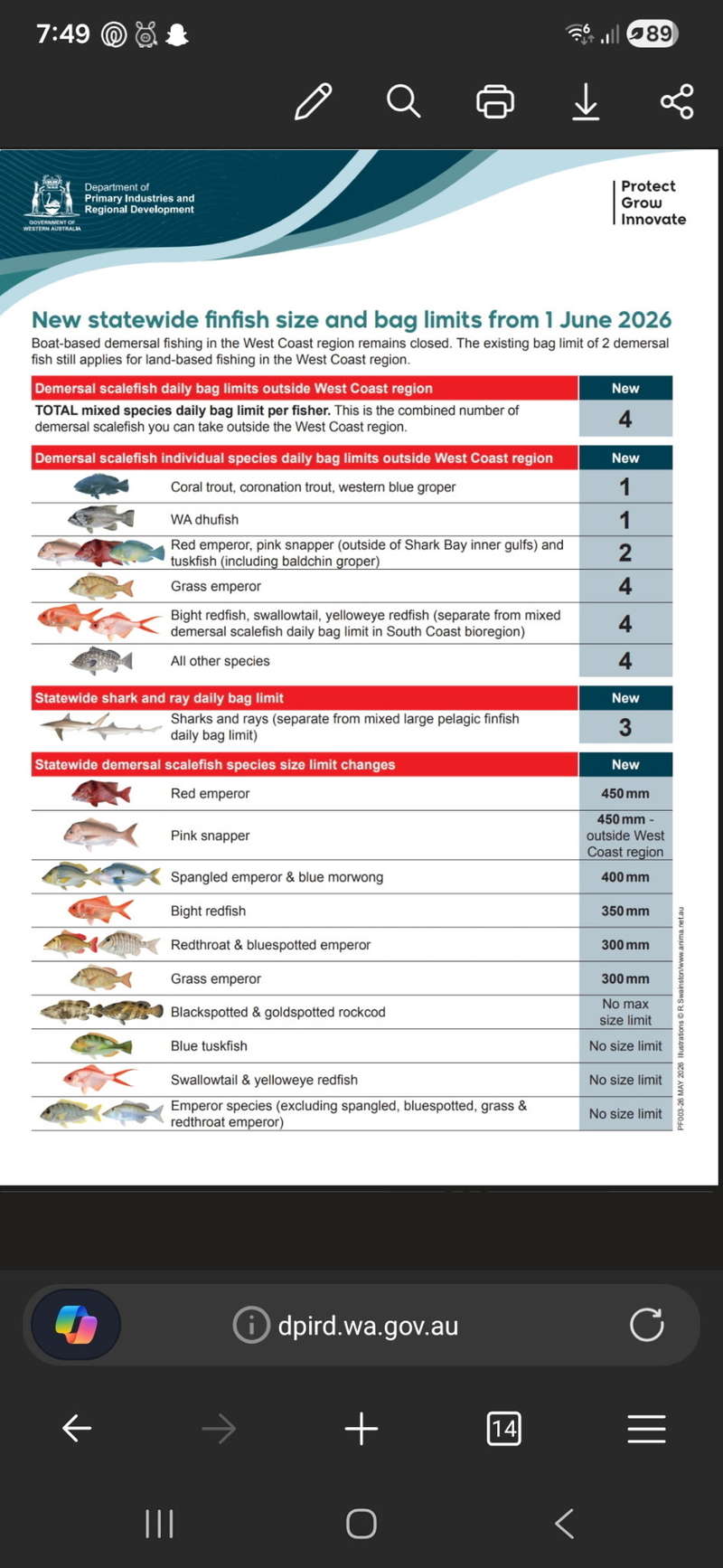
- 6 comments
- 832 reads
Sandy strikes again
Submitted by Faulkner Family on Thu, 2026-05-21 16:34Out for another fish today. Sandy got a pb on goldband and nailed a first with a 750 saddle tail. Certainly a bit of a shock seeing that one come up 
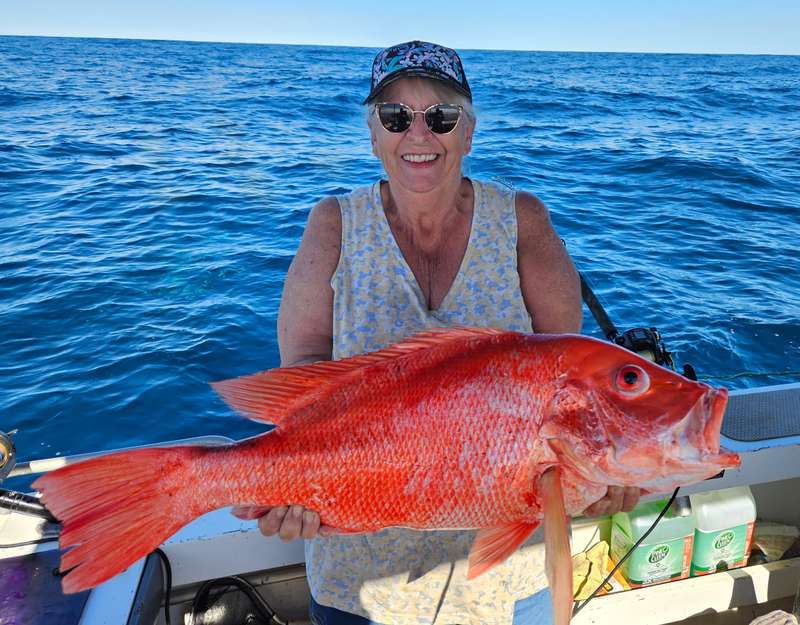
- 1 comment
- 546 reads
A few nice fish from today
Submitted by Faulkner Family on Wed, 2026-05-20 16:52Got a few nice fish today with another pb for Sandy with a monster pearly and a first for me , not sure exactly what it is but told it's a yellow lip cod . Meant to be great eating
.jpg)
.jpg)
- 6 comments
- 776 reads
PB TROUT FOR SANDY
Submitted by Faulkner Family on Sat, 2026-05-16 18:24Fished out from point Samson with not much to show for the day but Sandy got a pb trout of 630 . Landed in coral bay today for a week's fishing with the weather looking good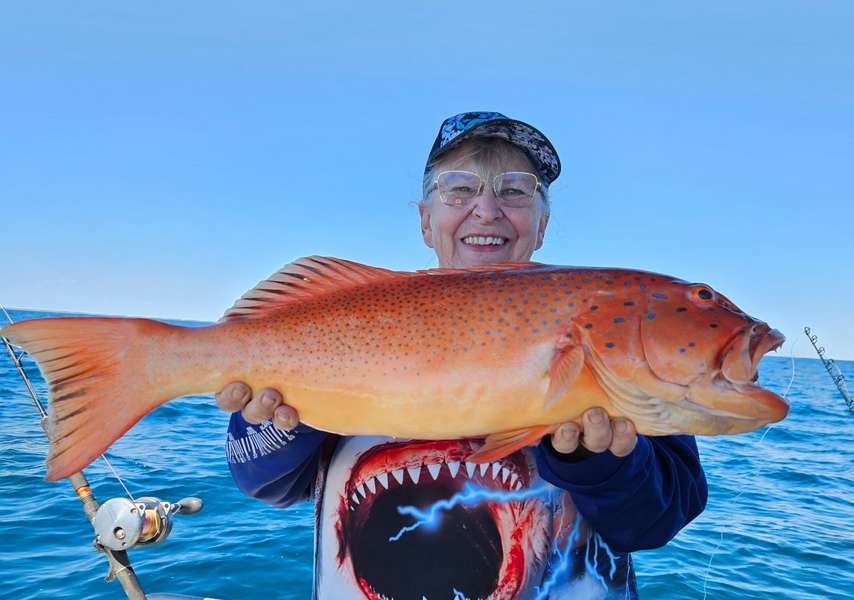
- 4 comments
- 694 reads
Fortescue Roadhouse reopening?
Submitted by Rob H on Tue, 2026-05-12 06:49Looks like Citic are planning to reopen Fortescue Roadhouse, they've installed a solar microgrid for the camp which is only sporadically used as well as EV fast charging.
It'd probably be the only remote EV charger thats not diesel powered 
"CPM Chairman Chen (Sam) Sui said the project reflects a broader shift towards more sustainable operations:
“This is a small but important step in our wider mission to make Sino Iron a green, intelligent mining operation.”
In addition to the microgrid, CPM has also partnered with Horizon Power to install an EV charging station at the Fortescue Roadhouse.
As part of Horizon’s WA EV Network, the fast-charging station supports cleaner transport along one of the state’s key regional corridors.
With the project now completed, we’ll also be going to market shortly to seek a roadhouse operator, with the aim of reopening the facility to motorists later this year."
- 4 comments
- 733 reads
1 mtr of skinny
Submitted by Faulkner Family on Thu, 2026-04-30 12:56Had a few hours to spare so went for a bash on the bank. Got a couple of small queenies and a 2 kg golden trev. Got this big queenie not long before high tide and lost another similar size
- 8 comments
- 2045 reads
Trump near miss
Submitted by piscetor on Sun, 2026-04-26 18:10Whats with these yanks. 13 million gun owners and they can't find one that knows how to shot properly. Bloody disjusting state of affairs. Maybe threes the charms.
Oh well better luck next time.
- 10 comments
- 1427 reads
Mobile phone booster recommendation
Submitted by davewillo on Wed, 2026-04-15 11:50Hi all we moved into a new house in an established suburb last September. The phone signal is terrible and calls either drop out completely or lose connection regularly until w-fi calling kicks in. I have a weak 4G signal most of the time but get a weak 5G at night. I want to install a booster but I know it can be an issue with the provider (Telstra) and I think only Cel-fi are approved for use.
Can anyone shed any light on the best way forward please? We only need to boost the voice calls as our wi-fi coverage is very good and very fast. We had 2 repeaters installed when we built so at least that works well! I can go through Telstra but the cost is high and I hate paying money to that organisation if I can avoid it!
- 7 comments
- 937 reads
I stand with BRS
Submitted by uncle on Wed, 2026-04-08 20:16Be interesting to watch this unfold
- 6 comments
- 1404 reads
New floor installed but found cracked rib - any advice
Submitted by GotOurFish on Mon, 2026-04-06 20:09Just ripped up and replaced the floor with new timber & carpet, cleaned the inside of the hull and all looks mint. Only problem is I noticed a cracked weld on the front port rib.
I have access to a mig welder set up for ally welding, but unfortunately my mate and myself are amateurs (will be removing fuel tank) so before we decide to tackle the job does anyone have any advice & has anyone had to do this before?
It's a quintrex 490 (I have checked all other welds and they look fine)
Anyway, I've added pictures of the old & new floor along with a picture of the broken weld.
Cheers in advance
- 6 comments
- 1474 reads
Good Friday mixed bag
Submitted by Faulkner Family on Fri, 2026-04-03 15:57The weather turned it on for us altho a little bit sloppy going out. The current was absolutely ripping drifting at almost 2 knots with no wind. Once we found some fish we set the minn kota and needed 24 Oz to hold the bottom in 22 mtrs of water. First line down at 9 and last line up just before 12 . Great day out and not complaining about the catch. 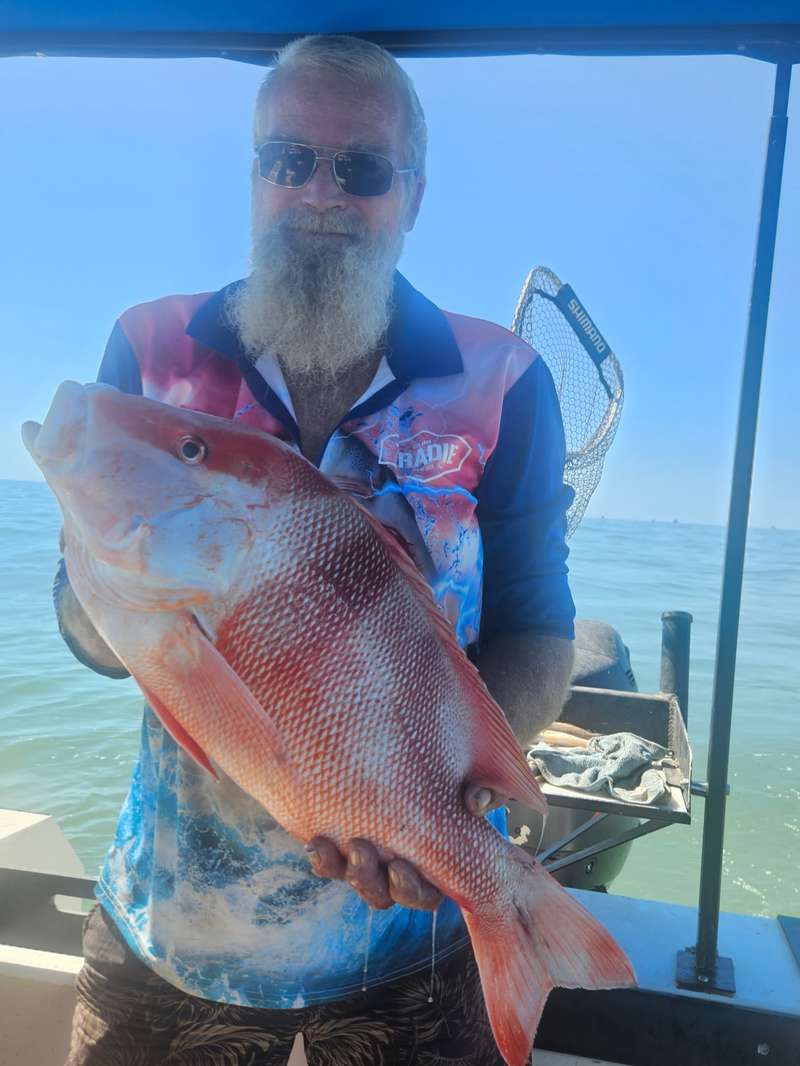


- 2 comments
- 754 reads
Sharks Don't Suck
Submitted by Faulkner Family on Thu, 2026-04-02 21:08Out on the blue and into the deep
With all the fish you wish to keep
Sounding around looking for ground
All of a sudden you had to turn around
As on the bottom you see a peak
Holding all the fish you wish to keep
You set up a drift and watch your line go down
Hoping you have found that magical ground
A solid bite and the fight was on as if on cue
It gets even harder a short time on just as you knew
You struggle then curse as the line goes slack
Ending you up flat on you back
Bringing up your line with a sour look and a fractured spine
All there was is an empty hook and some missing line
SHARKS DONT SUCK, THEY BITE
fishing ban in California. crazy
Submitted by Faulkner Family on Thu, 2026-04-02 18:59Just read about a total fishing ban in California. The world has realy gone nuts
- 1 comment
- 765 reads
The PM's message to Australia
Submitted by Alan James on Wed, 2026-04-01 18:53Keep Calm and Carry On. 
I'm sure some won't get it.
- 11 comments
- 1031 reads
Shelter Bay with no fuel?
Submitted by crisco on Mon, 2026-03-30 08:50We are heading back to Shelter Bay for our annual trip this year, or perhaps not!
Has anyone had any experiences of travelling for fishing, especially to Steep or Dirk Hartog through Denham and what was the experience getting fuel?
Are they receptive to supplying for boats and jerries heading across to camp? It's a ishing town unlike any other in the state with a lot of tourism revenue from fishing groups...
Cheers
Crisco
- 4 comments
- 880 reads
Something important to read lol
Submitted by Faulkner Family on Mon, 2026-03-30 07:38
EMPLOYEE NOTICE
Due to the current financial situation caused by the fuel crisis and the slowdown in the economy, the Government has decided to implement a scheme to put workers of 50 years of age and above on early, mandatory retirement, thus creating jobs and reducing unemployment.
This scheme will be known as RAPE (Retire Aged People Early).
Persons selected to be RAPED can apply to the Government to be considered for the SHAFT program (Special Help After Forced Termination).
Persons who have been RAPED and SHAFTED will be reviewed under the SCREW program (System Covering Retired-Early Workers).
A person may be RAPED once, SHAFTED twice and SCREWED as many times as the Government deems appropriate.
Persons who have been RAPED could get AIDS (Additional Income for Dependents & Spouse) or HERPES (Half Earnings for Retired Personnel Early Severance).
Obviously persons who have AIDS or HERPES will not be SHAFTED or SCREWED any further by the Government.
Persons who are not RAPED and are staying on will receive as much SHIT (Special High Intensity Training) as possible. The Government has always prided themselves on the amount of SHIT they give our citizens.
Should you feel that you do not receive enough SHIT, please bring this to the attention of your MP, who has been trained to give you all the SHIT you can handle.
Sincerely,
The Committee for Economic Value of Individual Lives (E.V.I.L.)
PS - Due to the Virus, recent budget cuts and the rising cost of electricity, gas and oil, as well as current market conditions, The Light at the End of the Tunnel has been turned off.
- 5 comments
- 909 reads
Starter motor boat winch set up
Submitted by GotOurFish on Fri, 2026-03-27 11:58Hi everyone, now that I have a bit of time on my hands with with tropical cyclone Narelle closing in, I thought i would post a few pictures of the winch I made.
It's a BA ford starter motor with matching flex plate, originally I was going to use a reduction starter but my younge bloke has this laying around so thought I would try it. Turns out it works fine! When it starts failing I'll use a reduction motor instead of rebuilding the existing one. I've had it on for a couple of months now and hasn't missed a beat, pulls the boat up in 20 seconds (using the lower gearing on the winch due to size of starter. Can still pull the trailer under the boat when beach retreating, not sure on time as just did it as a test)
On top of the tree is a switch with a rubber boot to activate the winch, i also wired in a DC garage remote relay so I can also use the set-up remotely (waterproof remote, I can post pictures and part numbers if anyone is interested as it took a bit of research)
The garage remote relay can handle 10A from memory, so i decided to install a 30A fused relay to take the load. I installed a 200A water proof circuit breaker with 50m2 wire for the motor, and a 100A mini isolator for the spigot trigger wire. I did it this way so when pulling the winch rope out for boat retrieval, you have the 200A circuit breaker off. In doing this you can hit the button on the remote throwing the spigot out, stopping the flex plate when you have enough rope out.
I made the shroud out of some mild steel sheet I had laying around, and is held in place with two M8 blots and thread serts. Pretty solid and takes seconds to remove.
It's all run off a battery that has a quick connection for charging. Inside the battery box is 5mm plate & rubber that thread bar goes through down to angle bar to secure everything. I am pretty remote so basically used what I had in the shed, all in all I'm pretty happy with how it turned out.
Total cost was around $350 ( mosty wiring & relays)
- 5 comments
- 775 reads
Footy 2026
Submitted by sea-kem on Mon, 2026-03-23 20:01Two weeks in and no thread so thought I'd start one.
With world war 3 happening I have to say footy is a welcome distraction and especially an Eagles win on the board.
I have a bet with a mate for an expensive bottle of red that the Eagles will win 4 or more games this year, on track imo with our new group of young lads lead by Murdock.
So good to see Yeo back on the track he brings the much needed leadership on field we need.
So a fantastic win yesterday for the boys after a putrid/facepalming first quarter, the umpiriing for both sides was atrocious.
My ladder prediction at the end of the year:
GCS
Hawks
Freo (struggled to write that)
Dogs
Crows
Swans
Cats
Lions (hungover)
Pies
Saints
Blues
Port
Roos
Mighty WC
GWS
Demons
Tigers
Bombers
- 39 comments
- 2392 reads
Blue lined feed
Submitted by Faulkner Family on Sun, 2026-03-22 13:38Got out a bit late after Sandy got delayed at her work . Hit the water a bit after 8. Weather was great with light winds but the current was ripping which mad it a difficult but we got our feed. The fish ranged from 420 to 520 with a couple of flags thrown in. Sandy also managed to get a couple of dusky morwong which put up a good fight. 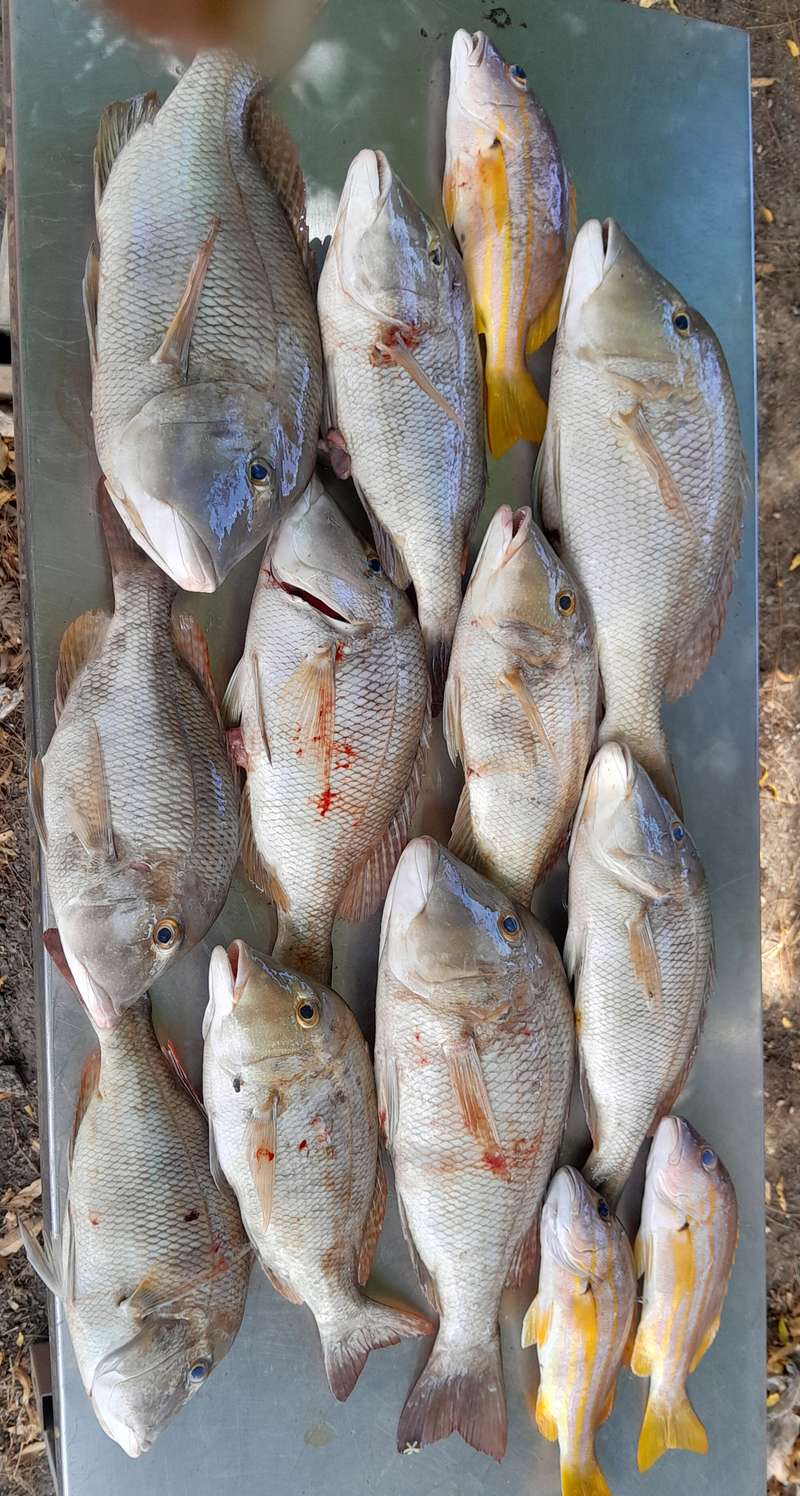
Damn fuel prices
Submitted by Faulkner Family on Wed, 2026-03-11 08:30This fuel price gouge is ridiculous. Currently the cheapest diesel in hedland is $2.39 . Bet the prices will go up a fair bit more. I can see fuel theft going up as well
- 35 comments
- 2576 reads
Outboard Service
Submitted by Bradmac73 on Mon, 2026-03-09 10:02
Hey all,
Who is your go to for outboard servicing? Specifically interested in options that service (if they are mobile) or are not too far from the Eastern Perth suburbs if there is any. Seem to be a number of mobile options that have closed shop.
appreciate any info.
cheers
- 7 comments
- 1069 reads
Drive by wire vs mechanical gear shift
Submitted by straith on Thu, 2026-03-05 14:54Hey guys, just about to repower, what's everyone's experience with drive by wire vs standard gear shift?
Is it worth the extra money?
Anyone had any problems with them? Im thinking at the fads and have an electronic problem and cant chg gears ??
- 10 comments
- 1148 reads
another good feed of yellowfin
Submitted by Faulkner Family on Thu, 2026-02-19 17:28Couple of hours to spare resulted in a good feed. A few big fish escaped in the process 
Quick trip, great catch
Submitted by Faulkner Family on Sun, 2026-02-15 14:59The weather gods turned it on for valentines day up here . We were on the water just after 7 with first lines down by around 8:30. First drift resulted in 6 nice blue lined then moved to another mark close by . 3 short drifts later another 3 blue lined came aboard with Sandy getting a small red which went back healthy then I got a red that went 440 so that was it . Back at the ramp by 11 . All up only about 1 1/2 hours fishing if that . 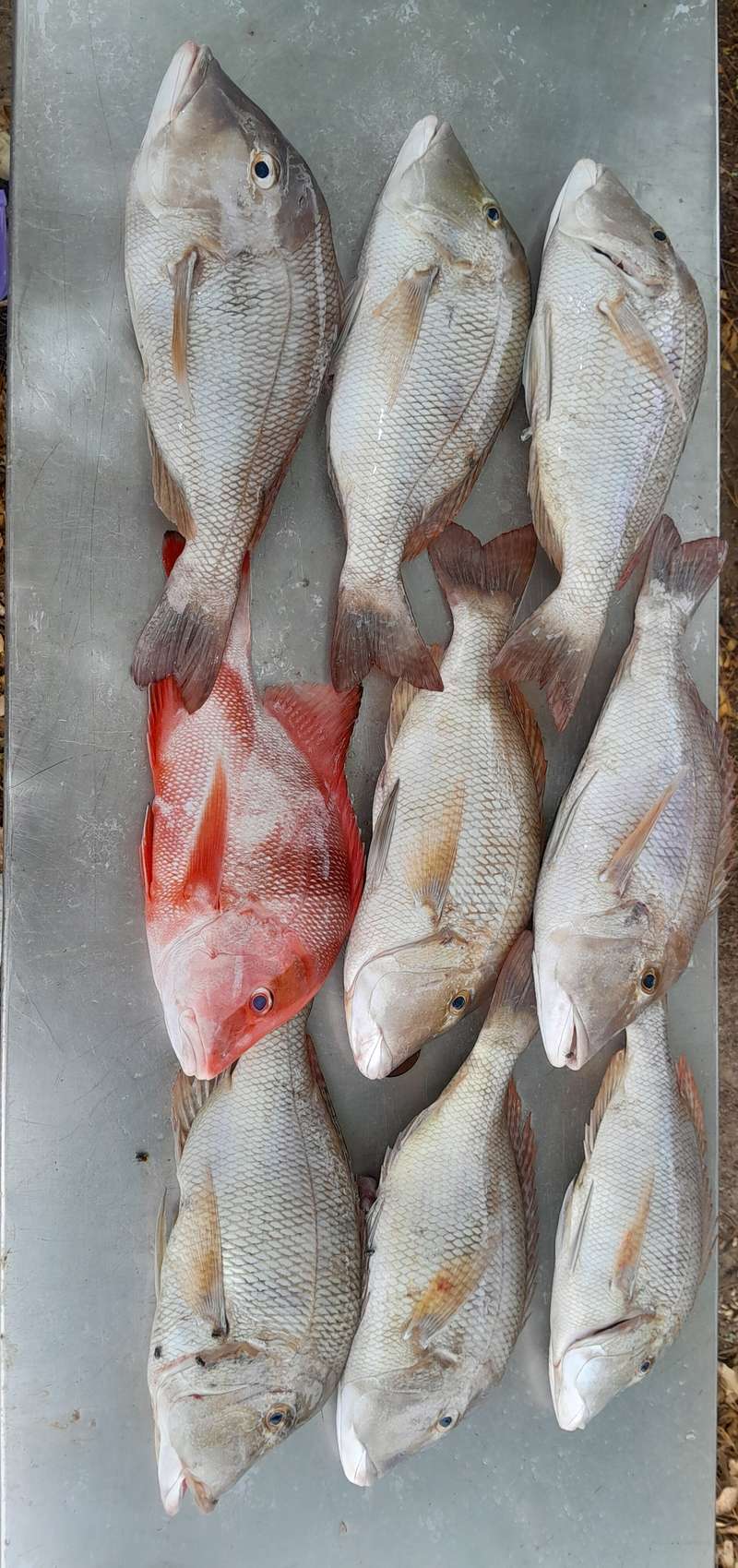
- 4 comments
- 1051 reads
Protest Rally
Submitted by carnarvonite on Fri, 2026-02-13 14:49Notice to all those who don't like the ban that has been introduced there is a rally planned for the 16 Feb at 5.30pm at the refuelling jetty around from the Casuarina boat ramp in Bunbury outer harbour. There will be guest speakers, a free attendance raffle bbq bronzie fillet burgers compliments of SW Seafoods and much more.
Those with boats can launch and ramp up off the jetty. The more the merrier to try to get the message across that the ban as gone too far and people's livelihoods have been greatly affected,
Hope to see all those who live down south around the Bunbury ,Busso area can attend, See you there.
Recent comments
7 min 2 sec ago
1 hour 57 min ago
17 hours 49 min ago
18 hours 25 min ago
21 hours 31 min ago
22 hours 33 min ago
1 day 53 min ago
1 day 54 min ago
1 day 15 hours ago
1 day 16 hours ago